A little more to explore…
Client project / Booking systems / Workflow automation
TeachSafer.
Reusable courses, bookable training runs and connected learner administration. A custom WordPress system linking session capacity, checkout and one-time roster delivery.
Project URL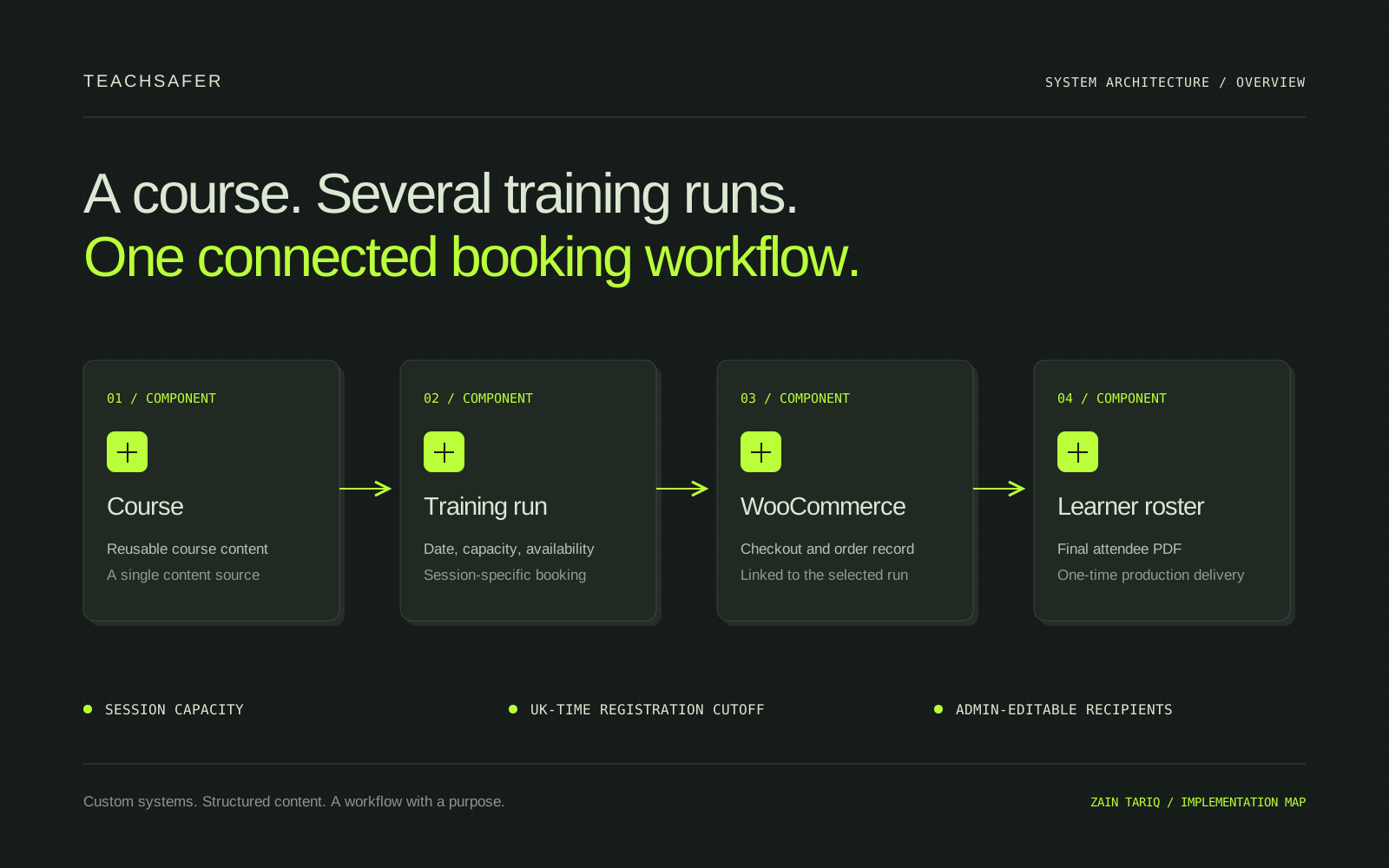
The implementation map
EXPLORE EACH PART OF THE SYSTEM
01 / SYSTEM COMPONENT
Course content
A reusable WordPress course entry holds the training information. Upcoming sessions are attached to the course instead of duplicating the complete page for each date.
ARCHITECTURE OVERVIEW / THIS PORTFOLIO DOES NOT RUN THE CLIENT’S PRIVATE SYSTEM.
01 / THE IMPLEMENTATION
The problem and context
TeachSafer needed a training booking platform, not simply a collection of course pages. Each course could have several upcoming training runs, each with its own date, location, capacity and booking status. The public journey needed to remain clear while the internal team managed bookings, learners and pre-course administration. The technical challenge was keeping the selected training run connected to the order and learner records, while making availability and registration closure consistent for that individual session.
02 / THE IMPLEMENTATION
What this demonstrates
The scope combined structured course content, dynamic session presentation, WooCommerce checkout and operational automation. The goal was to let a visitor understand a course, select a training date and book the correct run, while giving the team a practical WordPress interface for everyday management. My contribution covered the custom course and booking architecture, session logic, administrative workflows and the responsive presentation of the available training runs.
03 / THE IMPLEMENTATION
The decisions
Courses were treated as reusable content entries with individual bookable sessions attached to them. The course information could remain stable while new dates, locations and capacities were added underneath it. The frontend displayed those sessions within the relevant course page. This separated the content model from the schedule and kept the booking choice explicit when several dates were available.
04 / THE IMPLEMENTATION
Content and data
Each session carried its own training date, location, capacity, availability and session-specific booking information. The order remained associated with the selected run rather than only with the parent course. Booking and voucher references were carried into administrative learner records and final roster documents, giving the team a way to reconcile registrations against the appropriate training session.
05 / THE IMPLEMENTATION
Implementation
Custom capacity logic tracked confirmed learners independently for each run. Registration closed when capacity was reached or when the scheduled cutoff was reached. The scheduled rule used UK time and closed registration at midnight on the day before the training date. WooCommerce supplied checkout, order management and the payment workflow. The custom implementation connected purchases to the appropriate course session and supported both guest and registered customer journeys.
06 / THE IMPLEMENTATION
Validation approach
The supplied delivery account describes refinements to seat calculations, frontend and administrative consistency, checkout behaviour, payment processing and email delivery. Session layouts were adjusted for varying numbers of upcoming runs, including two, three or four sessions. A separate roster-testing option allowed administrators to generate and send a test roster to a designated address without closing registration or marking the production roster as sent. This portfolio does not repeat those tests against live customer bookings.
07 / THE IMPLEMENTATION
The result
Once a run closed, the platform generated a branded PDF of the confirmed learners, including relevant booking or voucher references, and distributed it to the configured team members. Production delivery was one-time, while administrative recipients could be changed from WordPress. The delivered system connected course content, session availability, checkout, learner records and pre-course documentation within the same WordPress environment.
08 / THE IMPLEMENTATION
Evidence and limitations
The case demonstrates custom CMS modelling, transaction-to-session linking and a scheduled operational workflow. The supplied document describes the implementation and its intended operational value; it does not provide independently measured conversion gains, saved administrative hours or commercial performance figures. Private learner records, real booking references, payment information and internal recipient addresses are deliberately excluded from this public case. The cover is an architecture illustration rather than a screenshot of a private interface.
09 / THE IMPLEMENTATION
Handover and next steps
The administrative workflow supports adding courses and runs, updating dates and capacity, reviewing bookings, changing roster recipients and testing roster delivery. The backend was intended to give the team control over routine operations without code changes. For a related agency task, the useful starting point is the actual content structure, booking rules, payment dependencies and acceptance checks. A review should agree that scope before promising changes to an active booking system.
Have a related task?
Bring the workflow.
We’ll clarify the next scope.
Jovin Security
Let’s scope the next task
GOOD WORK STARTS WITH A CLEAR BRIEF.
What needs
moving forward?
A WordPress issue, a small feature or a backlog item? Start with one clear brief. Availability, scope and timing are agreed before work begins.
SCHEDULED COLLABORATION / PKT · UTC+05:00
new-inquiry.md